> ## Documentation Index
> Fetch the complete documentation index at: https://densify-sync-changelog-16.mintlify.site/llms.txt
> Use this file to discover all available pages before exploring further.
# Overview
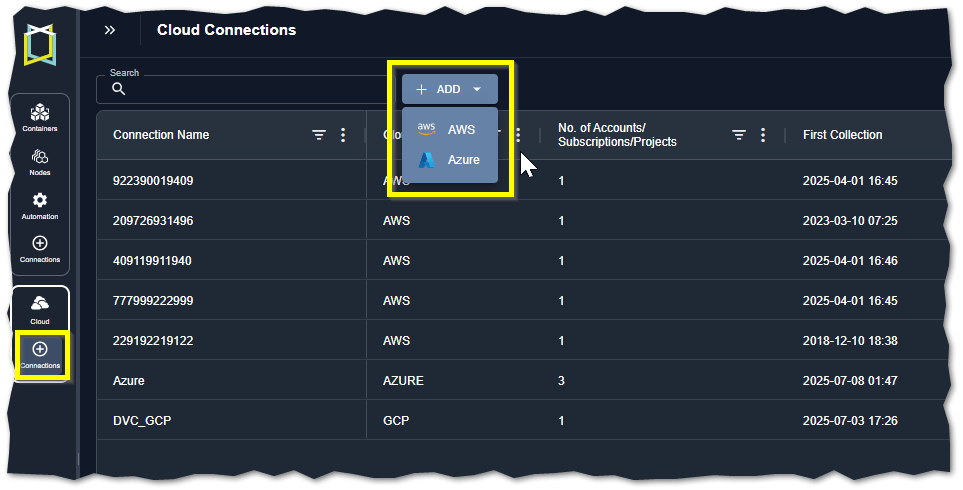
Use the Cloud Connections > Add button to create your cloud connections. Collected configuration and workload data from your public cloud accounts is analyzed and used to generate sizing and instance type recommendations.
## Supported Public Cloud Providers
The following cloud platforms are currently supported in Kubex:
See [Supported Platforms and Integrations - Public Cloud Platforms](/docs-kubex/Content/General/supported_platforms#public-cloud-platforms) for the complete list.
 ## Required User Roles
When working with cloud connections, all users can access and view the cloud connections page.
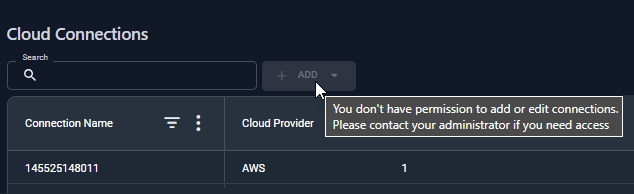
Only a user assigned to the "SaaS\_Audit\_Admin" group can create public cloud connections. See [Managing Kubex User Accounts](/docs/WebHelp_Densify_Cloud/Content/Densify_Com/Managing_Densify_User_Accounts) for details on adding the role to your user account.
## Required User Roles
When working with cloud connections, all users can access and view the cloud connections page.
Only a user assigned to the "SaaS\_Audit\_Admin" group can create public cloud connections. See [Managing Kubex User Accounts](/docs/WebHelp_Densify_Cloud/Content/Densify_Com/Managing_Densify_User_Accounts) for details on adding the role to your user account.
 ## API Access
You can collect and analyze cloud data through the Kubex API. Refer to the following use cases for examples:
## Considerations when Working with Large Environments
In large environments, Kubex highly recommends batching your accounts into smaller groups for improved performance when creating the cloud connections. i.e. 10 accounts at a time. You can use a resource tag, such as organization or business unit to split the total number of accounts so that is collected in manageable batches
## API Access
You can collect and analyze cloud data through the Kubex API. Refer to the following use cases for examples:
## Considerations when Working with Large Environments
In large environments, Kubex highly recommends batching your accounts into smaller groups for improved performance when creating the cloud connections. i.e. 10 accounts at a time. You can use a resource tag, such as organization or business unit to split the total number of accounts so that is collected in manageable batches